Thursday, January 12, 2012

30 min layout

Today I am bringing you a layout the can be created in 30 mins (or less if you are super speedy) that I created for The Scrapbooking Studio design team.
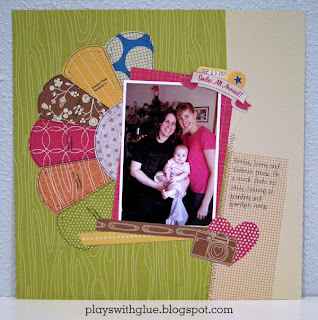
Supplies: Paper and Stickers - American Crafts; Dresden plate pattern - McCall's (resized in CorelDraw); Printer - Epson; Pen - Copic; Adhesive - Kokuyo.

 
Here's how:
  1. Start up your computer and while it's booting connect your printer and gather your supplies.
  2. Cut 4" wide by 6" pieces from 7 different pattern papers (these are going to be the dresden plate quilt pieces).
  3. Open the dresden plate print file and print 6 of the 'petal' pieces and then 1 of the center circle pieces. (Don't forget to set your page size to 4" wide by 6" high.)
  4. While the pieces are printing, use a craft knife to cut along the upper left corner of the camera and then along part of the edge of the heart. Cut just enough to tuck in the photo mat and picture plus a few strips of paper.
  5. By now the pieces should be done printing. Open your photo and print it at 4" wide x 6" high with a white border.
  6. While your photo is printing, trim out the dresden plate pieces. You can speed up this process by cutting the straight sides with your trimmer and then fussy cut the curved edges with scissors.
  7. Using a date stamp, add the date to an index tab sticker. Set aside to let the ink dry. (I used Versafine Sepia on an October Afternoon Cherry Hill collection sticker.)
  8. Your photo should be done printing and had a little extra dry time while you were completing items 6 and 7. Grab it off the printer, lay it over the paper you want to use and use your trimmer to cut the photo mat about a half inch larger than the photo on two sides. (Remember, dont measure it out. Just eyeball it so you can finish in under 30 minutes!
  9. Put adhesive on about half of the photo mat and slide the lower right corner into the slit that was cut around the camera and heart. Let it sit lightly tacked. DON'T FIRMLY ADHERE IT YET.
  10. Put a little adhesive on the back of each of your dresden plate pieces. Arange them by sliding the pieces under the photo mat and put the circle on top of the pieces.
  11. Add photo corner to upper right corner of photo mat, add photo, then add star and banner stickers.
  12. Cut paper strips to length and add to the bottom of the photo, making sure to tuck the right ends under the slit.
  13. When you are happy with the arrangement, then press all of the pieces down so they are firmly in place.

There you go! A quick and easy layout. Done and done. :)

Tuesday, January 10, 2012

Techniques on Tuesdays: Working with Vintage Photos

A couple of years back my grandma found some old negatives in her collection of family photos. I created a way to scan them and we now have digital prints of these priceless photos. Yay! But, even though they are digital, they are still limited prints of heritage photos that need to be properly preserved.

One of the things I find challenging about heritage photos is how to scrap them in an artistic way, without damaging the photos. Afterall, one of the main reasons to scrapbook is to preserve memories in an archivally sound way. For example, in the layout below, I wanted to layer elements over the photos as well as below them.

Supplies: Patterned Papers, Stickers, Journaling Card - Simple Stories; Photo Corners - Recollections; Twine - Unknown; Pen - Sakura; Journaling Spot - Maya Road

So to protect the vintage photos I used a few tricks. First, I used photo corners to hold the photos on the page.

Then, I cut clear acetate to the same size as the photos and slipped them over the top of the photos and into the photo corners in order to protect the photos. That way, I could still layer the ticket stickers over the bottom of the photos to achieve the layout I wanted, while still preserving the integrity of the photos.

If you'd like to use this technique on your next layout, here's what I use:


I also incorporated a shopping bag from The Scrapbooking Studio. Even though the bag wasn't acid free, I used Archival Mist to make it safe for use with photos.

Wednesday, January 4, 2012

Cards on Wednesdays

Well, how perfect is this? It's time for cards on Wednesdays and today I have a birthday card to share with you AND it's my birthday (and my boss' birthday). Who knew the scrappy fates would align so perfectly today!?

So I leave you with this Birthday card that I designed for The Scrapbooking Studio Design Team while I head off in search of a piece of cake :)

Supplies: Patterned Papers, Canvas Stickers, Pen - American Crafts; Felt Flower - Basic Grey; Stamp - Studio G; Cardstock - Bazzill; Ink - Versafine; Adhesive - Kokuyo

Tuesday, January 3, 2012

Techniques on Tuesdays: Snow Card with "Faux Blizzard" Paint Technique

Ah, it's Tuesday again, and you know what that means... it's time for another technique!

As much I'd love for you all to think that my scrapbooking room is perfectly styled and that all of my projects just magically appear in simple perfection, made with my flawlessly manicured hands.... I have to break it to you, my endeavors are really far more "test kitchen" than a seamless craft segment ready for its prime time spotlight on The Martha Stewart Show. I know, I know... you're all just shocked by today's revelation.

...

...Aren't you!?

So anyway, always wanting to be an overachiever I felt the need to create what I like to call "the faux blizzard" techinque... well... um that or I accidentally managed to somehow get white paint all over my fingers, and then discovered that I had also unknowingly  managed to smear it all over my project. I'll let you decide which version of the story is the truth. *wink*

Supplies: Kraft cardstock - The Paper Studio; Patterned Papers - Little Yellow Bicycle; Letters - Tim Holtz Grungeboard; White Paint - Ranger; White Pen - Sharpie; Circle Punch - EK Success; Pearl - Queen&Co; Ribbon, Snowflake Punch -Martha Stewart

Here's how to create the "Faux Blizzard" Paint technique seen at the bottom of the card
  1. Get paint on your fingers. Not tons, but enough to create a few solid spots of paint on the kraft cardstock. 2. Do a little finger painting. (Anyone else thinking of a quote from the movie "The Cutting Edge" right now? No. Oh... um... never mind then.) Using your painty fingers add a few dots and a few streaks of solid white to the punched area. 
  2. Let solid paint dry. (If you're impatient like me, speed up the process with a heat gun.)
  3. Water down the paint in a Ranger Snow Cap dabber. You can do this by squirting a few shots of water from a mini mister and then mixing the water into the paint with a popsicle stick. Otherwise, sometimes (if you haven't used your paint in awhile) if you don't shake it before applying it, you can get a watery affect too.
  4. Swipe the top of the dabber across the die cut area to get a streaky paint effect. If it's too thick use a damp paper towel to lift off some of the paint until you get the desired effect.
  5. Make sure you do this BEFORE you add your patterned paper!


Monday, December 26, 2011

The Scrapbooking Studio Design Team: Quick & Easy Christmas Gift

For one of this month's design team projects for The Scrapbooking Studio I put together a 7ge Printer's Tray will some favorite images from a dear friend's wedding. I mixed it with some Teresa Collin's Notations collection papers.

While this one will be on display at The Scrapbooking Studio for a bit, this would make a great Christmas or Anniversary gift for the new brides in your lives. (I'm guessing you may know a few since Christmas is a popular time to get engaged!)

Printers tray and stand; round sticker - Seven Gypsies; Patterned papers, letter "F" - Teresa Collins; Metal frame, numbers, bottles - Tim Holtz; Black paint - Ranger; Black embossing powder - American Crafts; Purple flowers - Prima; Pearls - My Mind's Eye; Purple bead glitter - Martha Stewart; Cream letters - Momenta; Letter stickers - October Afternoon; Putple Spica Pen - Copic; Trinket pin - Maya Road; Seam binding ribbon - Craft Supply; "Oct" letters - Girls Paperie; Purple Cardstock - The Paper Company; Label Die Cut - Spellbinders; Number "11" stickers - Making Memories.

They were planning to decorate their master bedroom in cream and black with damasks, so the papers from the Teresa Collins "Notations" lines were just perfect for this project!


The photos are all 4" x 6" or less, so it was super easy to run them through my Xyron 510 (it has a 5" width) to make sure that they were evenly covered with adhesive and would be firmly affixed to the printer's tray. For the smaller pieces, I used the Xyron 1.5" (aka 150 or "X" sticker maker). I have always found the Xyron's permanent adhesive to be quite sturdy and reliable.


I used some letters from The Girls Paperie along with some findings from the Tim Holtz Ideaology line to add their wedding date to a few of the squares. The "08" letters were originally silver, which of course wouldn't show well against the cream, so I first painted them black and then heat embossed them with black powder. Their wedding colors were purple, so I filled the mini bottles with two shades of lavender beaded glitter and glued the corks shut so they wouldn't spill.

One of the things I love about Teresa Collin's lines is that she often does ones that are simply just black + cream or black + white. This versatility lets you customize your color scheme with paints and inks to fit your needs. In this case, I colored it in with a purple Copic Spica to add a little glimmer while introducing the purple wedding color. I also used some rub-ons to make a little monogram in the banner.


Head on over to The Scrapbooking Studio to see this project in person and pick one up for yourself. And don't worry about how you'll fill the little boxes, there are guides to the sizes on the Seven Gypsies website and it's a great way to use up little extra trinkets in your stash.

Wednesday, December 21, 2011

Family Frame

Did you have a grand plan to make all of your Christmas gifts this year? Are you finding yourself running out of time to get them done?

Here's a quick and easy project for you!

I found this frame at Staples for about $4. It has two 4"x6" openings and two 4"x4" openings. And it just so happens that the lovely people at Simple Stories happen to make pattern papers that have designs in 4x6 and 4x4 so all you have to do is pick your theme (baby, birthday, family, everyday, summer, school, etc.) and add some of their designs to the windows. For this frame I chose to use pattern paper and embellishments in all of the openings, but you could use pictures for some of them. You could also put the family's name or "est. date" in one of the windows (instead of the ruffled ribbon.)


Design for The Scrapbooking Studio
Patterned paper - "Generations" by Simple Stories; Key, Clock hands, Token, Brad, Washer - Tim Holtz; Cream ribbon - Offray; brown ribbon & rhinestone embellishment - Prima; Ink - Color box.


Since I used lumpy embellishments, I took the glass out, but it would also be cool to leave the glass in and add vinyl or something over the top of it.

Monday, December 19, 2011

Gifting on the Fly

As the countdown to Christmas runs down you may be finding yourself in a pickle with those hard to buy for people on your list. If you are like me, that means gift cards to the rescue! The only thing I dislike about gift cards is that they seem rather cold and impersonal so I like to present them in a handmade gidt card holder.

On my way home from work tonight  I needed a last minute gift (literally walked into the store at 5:32 and had to be at my destination with gift in tow by 6). Fortunately the giftee is a fellow scrapbooker so I popped into my LSS for a gift card. This year they are offering cute little paper bags embossed with snowflakes to put their gift cards in. Not only did I need to purchase the gift card, I needed to wrap it in store too, so I grabbed a cute little elf sticker (Doodlebug, $1.49) and a foot of metallic red cord (May Arts, 25¢) and wrapped it up at the checkout counter. (Many thanks go out to Michelle for holding it still while I wrapped the cord and for lending her finger to tie the knot.)

Here's the result. It literally under 5 minutes including checkout!

Please excuse the sideways photo. I am blogging from my phone and can't find a way to rotate it.